Data Store objects (Similar to ODS of earlier versions) serves as a storage location for consolidated and cleansed transaction/ master data on a document level. This data can be used in BEx reporting. This deals with flat reporting and not at all related to extended star schema or multidimensional structure in infocube. DSOs contains key fields and data fields. Key fields forms the key combination of the characteristics and data fields contains key figures and other characteristics.
 A standard data store object contains three tables
1> New data table
2> Change log Table
3> Active data table
New data table (Activation queue): Used to save Data Store object data records that need to be updated, but that have not yet been activated. After activation, this data is deleted if all requests in the activation queue have been activated.
Active data: A table containing the active data (A table). Reporting of DSOs are done from Active data table.
Change log: Contains the change history for the delta update from the Data Store object into other data targets, such as other Data Store objects or Info Cubes.
 The tables of active data are built according to the Data Store object definition. This means that key fields and data fields are specified when the Data Store object is defined. The new data table and the change log are almost identical in structure: the new data table has an SID as its key, the package ID and the record number; the change log has the request ID as its key, the package ID, and the record number.
Data can be loaded from several source systems at the same time because a queuing mechanism enables a parallel INSERT. The key allows records to be labeled consistently in the activation queue. The data arrives in the change log from the New data table and is written to the table for active data upon activation. During activation, the requests are sorted according to their logical keys. This ensures that the data is updated to the table of active data in the correct request sequence.
Over Writing functionality
If two records of same key combination comes then over writing will happen. With in a request the over writing is done in update rules. Within different request over writing is done during activation in change log table.
Example for Activating and Updating Data
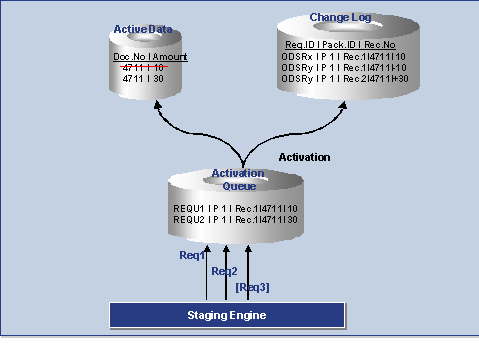 1. Request 1 with amount 10 and request 2 with amount 30 are loaded parallel into the DataStore object. This takes you to the activation queue. You are given a unique request ID there.
 2. When you carry out the activation step, the requests are sorted by key, transferred into the table containing the active data, and immediately deleted from the activation queue. In the table containing the active data, the amount 10 is replaced by 30 (since Overwrite is set as the update type).
3. When you activate the data, the change log is also notified: The old record from the active table is saved as a negative (-10) and the new record is stored as a positive (+30).
4. If all the records are activated, you can update the changes to the data records for the DataStore object in the related Info Provider in a separate step. The amount in this example is increased in the related Info Providers by 20.


