Thursday, 5 August 2010

SAP GUI 7.20 Download

This is a new release for SAP GUI compatible with Windows7 and Office2010. Please click the link and download the file directly.


The new SAP GUI release comes with a number of useful new features:
- Support for Windows 7 operating system & Office 2010 package (32bit version)
- SAP Logon: Hierarchical organization of items in an explorer like view and a tree like view.
- SAP Logon: With release 7.20, an administrator can define a central saplogon.ini which can be merged into the local user specific saplogon.ini.
- Options Dialog: Almost all options have been merged into a new user friendly dialog that replaces Tweak SAP GUI and the old options dialog.
- Security Enhancements: A set of maintainable security rules which allow administrators and users to prevent unwanted access to the client PCs from SAP systems have been defined.
- Animated Focus Frame: Improved visualization of the focus and its movement across the screen.
- High Contrast Theme for SAP Signature Design: Improved visual design for users with visual impairments, based on the successful SAP Signature Design.
- Better organization of local data: Downloaded files, traces, scripts and other local objects are stored in different folders (roaming and local) according to Windows standards.

Besides this SAP GUI for Windows 7.20 is fully compatible with older SAP GUI releases.

Since SAP GUI for Windows 6.20 will be out of maintenance as of 1st of January 2011 and SAP GUI for Windows 7.10 will be out of maintenance as of 13th of April 2011 we recommend to start planning the upgrade to release 7.20 as soon as possible.

Download link

Thursday, 1 July 2010

Infopackage dynamic selection routine

This will explain , how to give dynamic selection for periodic loading using infopackages.
After creating an infopackage go to "Data Selection" tab. Give Type - 6 Abap Routine for the required selection criteria. Here I am loading the data with selection "Previous Month" (0calmonth).

Give a description and click enter. It will move to the Scheduler routine screen.


Enter the code as below (highlighted).

*$*$ begin of routine - insert your code only below this line *-*
data: l_idx like sy-tabix.
read table l_t_range with key
fieldname = 'CALMONTH'.
l_idx = sy-tabix.
*....
l_t_range-low = sy-datum(6) - 1.
l_t_range-high = sy-datum(6) - 1.
modify l_t_range index l_idx.

p_subrc = 0.

*$*$ end of routine - insert your code only before this line *-*

Save this.

This will make the month range to previous month . "l_t_range" table is of type structure RSSDLRANGE (contains Sign, Option, Low, High). We need to populate these fields to pass range dynamically.

Tuesday, 4 May 2010

Data Store objects
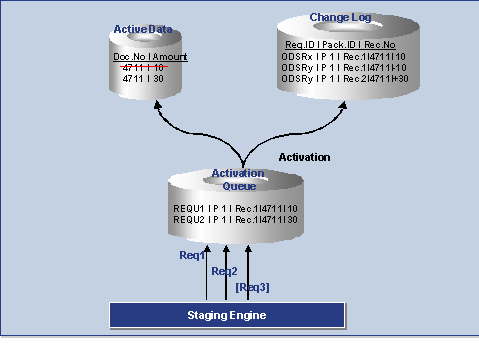
Data Store objects (Similar to ODS of earlier versions) serves as a storage location for consolidated and cleansed transaction/ master data on a document level. This data can be used in BEx reporting. This deals with flat reporting and not at all related to extended star schema or multidimensional structure in infocube. DSOs contains key fields and data fields. Key fields forms the key combination of the characteristics and data fields contains key figures and other characteristics. A standard data store object contains three tables
1> New data table

2> Change log Table

3> Active data table
New data table (Activation queue): Used to save Data Store object data records that need to be updated, but that have not yet been activated. After activation, this data is deleted if all requests in the activation queue have been activated.

Active data: A table containing the active data (A table). Reporting of DSOs are done from Active data table.

Change log: Contains the change history for the delta update from the Data Store object into other data targets, such as other Data Store objects or Info Cubes.
The tables of active data are built according to the Data Store object definition. This means that key fields and data fields are specified when the Data Store object is defined. The new data table and the change log are almost identical in structure: the new data table has an SID as its key, the package ID and the record number; the change log has the request ID as its key, the package ID, and the record number.

Data can be loaded from several source systems at the same time because a queuing mechanism enables a parallel INSERT. The key allows records to be labeled consistently in the activation queue. The data arrives in the change log from the New data table and is written to the table for active data upon activation. During activation, the requests are sorted according to their logical keys. This ensures that the data is updated to the table of active data in the correct request sequence.

Over Writing functionality

If two records of same key combination comes then over writing will happen. With in a request the over writing is done in update rules. Within different request over writing is done during activation in change log table.

Example for Activating and Updating Data
1. Request 1 with amount 10 and request 2 with amount 30 are loaded parallel into the DataStore object. This takes you to the activation queue. You are given a unique request ID there.

2. When you carry out the activation step, the requests are sorted by key, transferred into the table containing the active data, and immediately deleted from the activation queue. In the table containing the active data, the amount 10 is replaced by 30 (since Overwrite is set as the update type).


3. When you activate the data, the change log is also notified: The old record from the active table is saved as a negative (-10) and the new record is stored as a positive (+30).


4. If all the records are activated, you can update the changes to the data records for the DataStore object in the related Info Provider in a separate step. The amount in this example is increased in the related Info Providers by 20.

Monday, 1 February 2010

Process chain maintenance - Process Types

Process types are maintained in table "RSPROCESSTYPES"
In RSPC screen goto Settings -> Maintain Process types
Please check a list below for process types and description.

Monday, 30 November 2009

Translate BI Objects


Wonder why this tab "Translation" for?
Click here for details...

Monday, 26 October 2009

Change SAP authorization roles

To edit or change role for adding authorization to new objects like infocube , infosource etc. Main Transactions used are SU01 and PFCG.

1> Got Transaction SU01

2> Copy the Role that need to be edited..
3> Goto PFCG. Give the Role name and Click Change
4> Goto Authorization tab and Change Authorization Data
5> Add which source, target etc needs to be authorized to the role
6>Go back to the last screen and go to Users tab. Click on User comparison and then execute Complete comparison


Monday, 13 July 2009

Selective deletion in Process chains

Before loading the data to InfoCube, sometimes we need to delete the particular date range data in InfoCube based on some selections i.e. using selective deletion and then load the data to InfoCube
Download